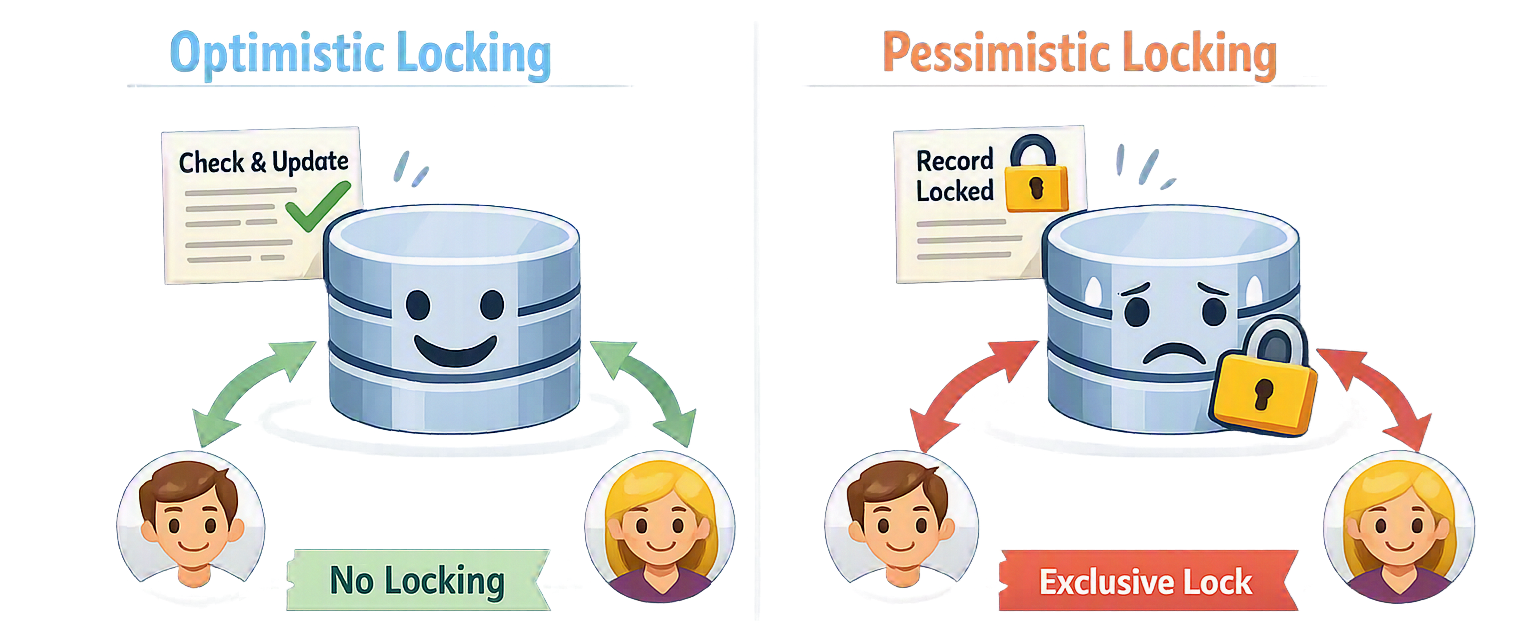

Optimistic vs Pessimistic Locking in EF Core
Two customers check out the same product at the same time. Both see “1 left in stock”. Both complete the order. One of them walks away with a confirmation email for an item that was never actually available (the stock count was silently decremented twice). No exception, no warning, no trace in the logs. This is the lost update problem, and by default EF Core does nothing to stop it.
There are two families of answers to this, and they disagree about how often conflicts actually happen. Optimistic concurrency assumes conflicts are rare: let everyone read and write freely, but detect at save time that someone got there first. Pessimistic concurrency assumes conflicts are likely: lock the row when you read it, so nobody else can touch it until you’re done.
In this post we’ll implement both in EF Core: concurrency tokens and rowversion for the optimistic side, transactions and SQL Server lock hints for the pessimistic side. Then we’ll talk about how to resolve a conflict once you’ve detected one, using a small product catalog as our running example. Let’s dive in!
The Lost Update Problem
Let’s make the problem concrete. Two DbContext instances read the same product, both change the price, and both save:
using var contextA = new StoreDbContext();
using var contextB = new StoreDbContext();

var productA = contextA.Products.Single(p => p.Id == 1); // Price = 49.99
var productB = contextB.Products.Single(p => p.Id == 1); // Price = 49.99

productA.Price = 39.99; // A applies a discount
contextA.SaveChanges();

productB.Price = 44.99; // B applies a different discount
contextB.SaveChanges(); // A's discount is gone, and nobody knows
Both UPDATE statements succeed, because the second one is just UPDATE Products SET Price = 44.99 WHERE Id = 1. The database has no idea that the row changed between B’s read and B’s write. Both strategies exist to restore that missing piece of information (the row is not what I read), just in very different ways.
Which one you want depends on the workload:
- Optimistic: When conflicts are rare, transactions are short, or the user works disconnected (an admin editing a product page, a mobile app syncing later). Nothing is blocked, and you pay only when a conflict actually happens.
- Pessimistic: When conflicts are common and expensive: stock decrements, flash-sale checkouts, account balances. You trade throughput for the guarantee that a conflict can’t happen in the first place.
Optimistic Concurrency
The idea is simple: include the value you originally read in the WHERE clause of the UPDATE. If somebody changed the row in the meantime, zero rows match, and EF Core knows the update was lost.
Implementation
Option 1: IsConcurrencyToken()
The lightest option is to mark an existing property as a concurrency token in OnModelCreating, using the IsConcurrencyToken() Fluent API call:
public class Product
{
    public int Id { get; set; }
    public string Name { get; set; }
    public decimal Price { get; set; }
}

protected override void OnModelCreating(ModelBuilder modelBuilder)
{
    modelBuilder.Entity<Product>()
        .Property(p => p.Price)
        .IsConcurrencyToken();
}
IsConcurrencyToken() doesn’t add any behavior to the property itself. Price is still a plain decimal you set like any other. What it changes is how EF Core builds the UPDATE statement: every property flagged this way is added to the WHERE clause, compared against the value EF Core originally read into OriginalValues when the entity was loaded. Without it, the WHERE clause only ever matches on the primary key.
Concretely, marking Price as a token turns this:
UPDATE [Products] SET [Price] = @p0 WHERE [Id] = @p1;
into this:
UPDATE [Products] SET [Price] = @p0 WHERE [Id] = @p1 AND [Price] = @p2;
where @p2 is the price EF Core fetched when it first loaded the row not the new value. If someone else changed the price in between, that predicate matches nothing, the affected-row count comes back as 0, and EF Core raises DbUpdateConcurrencyException instead of quietly reporting success. A few things worth knowing about it:
- It’s a per-property opt-in. You choose exactly which columns count as “the row changed”.
- It only affects
SaveChanges()/SaveChangesAsync(). - You maintain the value yourself. Unlike the
rowversioncolumn below, EF Core doesn’t update a concurrency-token property for you.
Option 2: IsRowVersion()
On SQL Server, the better default is a dedicated rowversion column. Add a byte[] property and configure it with IsRowVersion():
public class Product
{
    public int Id { get; set; }
    public string Name { get; set; }
    public decimal Price { get; set; }
    public int StockQuantity { get; set; }
    public byte[] RowVersion { get; set; } // Maintained by SQL Server, never set it yourself
}

protected override void OnModelCreating(ModelBuilder modelBuilder)
{
    modelBuilder.Entity<Product>()
        .Property(p => p.RowVersion)
        .IsRowVersion();
}
The database bumps this value on every update to the row, so it protects the whole entity, and you don’t have to remember to call IsConcurrencyToken() on each new column.
UPDATE [Products] SET [Price] = @p0
OUTPUT INSERTED.[RowVersion]
WHERE [Id] = @p1 AND [RowVersion] = @p2;
If another user already saved, @p2 no longer matches, zero rows are affected, and EF Core turns that into an exception. So the second save now fails loudly instead of silently winning:
productB.Price = 44.99;
contextB.SaveChanges(); // throws DbUpdateConcurrencyException
Resolving Conflicts
Catching the exception is the easy part. Deciding what to do next is the actual design work, and EF Core gives you the material through ex.Entries.
Store Wins
Discard the user’s edit and reload whatever is in the database:
try
{
    context.SaveChanges();
}
catch (DbUpdateConcurrencyException ex)
{
    foreach (var entry in ex.Entries)
    {
        entry.Reload(); // Database values overwrite the in-memory entity
    }
}
Client Wins
Keep the user’s edit and force it through, by telling EF Core that the current database values are what we originally read:
catch (DbUpdateConcurrencyException ex)
{
    foreach (var entry in ex.Entries)
    {
        var databaseValues = entry.GetDatabaseValues();
        entry.OriginalValues.SetValues(databaseValues); // Refresh the token, keep our changes
    }

    context.SaveChanges();
}
Merge
The honest option, and usually the right one for a UI: compare property by property and decide or show both versions and let them choose.
catch (DbUpdateConcurrencyException ex)
{
    foreach (var entry in ex.Entries)
    {
        var proposedValues = entry.CurrentValues;
        var databaseValues = entry.GetDatabaseValues();

        foreach (var property in proposedValues.Properties)
        {
            var proposed = proposedValues[property];
            var database = databaseValues[property];

            // Your rule here: last-writer, field ownership, or ask the user
            proposedValues[property] = proposed;
        }

        entry.OriginalValues.SetValues(databaseValues);
    }

    context.SaveChanges();
}
Limitations
ExecuteUpdateandExecuteDeletebypass the change tracker entirely, so concurrency tokens are not checked. The same goes forFromSqlRawandExecuteSqlRaw.
Pessimistic Concurrency
Sometimes detecting a conflict after the fact is too late. If two checkouts both read a stock quantity of 1 and both decide the sale is fine, retrying doesn’t help. You needed the second reader to wait.
EF Core has no built-in API for taking database locks. There’s no SELECT ... FOR UPDATE equivalent in LINQ, so you drop down to the provider and take the lock in SQL yourself. On SQL Server that leaves you two ways in: table-level lock hints on the query that reads the row, or a transaction isolation level that changes the locking behavior of every statement inside it. Lock hints give you precise control over one query. Isolation levels are the blunt instrument, applied for the life of the transaction.
Lock hints
Step 1
Locks only exist inside a transaction, so start there with BeginTransaction():
using var context = new StoreDbContext();
using var transaction = context.Database.BeginTransaction();
Step 2
Read the row through FromSqlRaw, asking SQL Server for an update lock with the UPDLOCK hint:
var product = context.Products
    .FromSqlRaw("SELECT * FROM Products WITH (UPDLOCK, ROWLOCK) WHERE Id = {0}", 1)
    .Single(); // Row stays locked until Commit() or Rollback()
UPDLOCK blocks other writers while still allowing readers. Add HOLDLOCK when you also need to prevent inserts into the range you just read.
Step 3
Check the stock, decrement it, and commit. The lock is released the moment the transaction ends:
if (product.StockQuantity < 1)
{
    throw new InvalidOperationException("Out of stock.");
}

product.StockQuantity -= 1;
context.SaveChanges();
transaction.Commit(); // Lock released here
N.B: a lock lives for the entire lifetime of its transaction. Keep those transactions as short as you possibly can, and never wait on HTTP calls, payment gateways, or user input while holding one.
Isolation Levels
Instead of hinting one query, you can tell the whole transaction to lock more as it goes. That’s what the isolation level controls:
using var transaction = context.Database
    .BeginTransaction(IsolationLevel.Serializable);
Think of the three levels as three amounts of “how much can change around me while I’m working”:
- Read Committed (the default): you only see committed data, but if you read the same row twice, it might have a different value the second time.
- Repeatable Read: rows you’ve read can’t change under you anymore. Nobody can update or delete them until your transaction is done.
- Serializable: on top of that, nobody can insert a new row that would have matched your earlier query either. It’s the strictest level, and the only one that stops a sneaky “check, then insert” bug (someone slipping in a row you didn’t know to lock).
For pessimistic locking, use Serializable. The other two levels stop existing rows from changing, but they don’t stop a new row from showing up and quietly getting past your check.
Limitations
- Locked requests make other requests wait. During a flash sale, that pile of waiting checkouts can eat up all your open database connections before the database itself even breaks a sweat.
- You can still hit a deadlock: two transactions each waiting on a lock the other one holds. SQL Server kills one of them off with error 1205, so your code still needs to catch that and retry.
- The lock hints are plain SQL Server syntax.
WITH (UPDLOCK)doesn’t mean anything to PostgreSQL or SQLite, so you can’t just copy this code to a different database.
Choosing Between Them
There’s no single right answer, but asking yourself these four questions usually points you the right way:
- How often do conflicts actually happen? Don’t guess, measure it. Picture a store with a hundred products. Two merchants editing the same product at the same second is rare. That’s why product edits are usually a good fit for optimistic: you’re paying almost nothing, because the conflict almost never happens.
- How much time passes between reading and writing? A checkout takes a few seconds from start to finish, so holding a lock for those few seconds costs you little. A merchant editing a product page might read the row, then go get coffee, then come back ten minutes later to hit save. You can’t hold a database lock for ten minutes while someone’s away from their desk, so that case has to be optimistic.
- Can the user actually fix a conflict themselves? Think of two people editing the same document. If you can show them “here’s what you changed, here’s what changed on the server, pick one or merge them”, that’s a good experience, and optimistic concurrency gives you exactly that moment to step in. But if the only thing you can say is “someone else got there first, please try again”, you haven’t really helped them. In that case, it’s kinder to prevent the conflict up front with a lock.
- What happens if things go wrong? Not all conflicts are equally bad. If two people edit a product description at the same time and one edit gets lost, that’s mildly annoying, someone re-types a sentence. But if two customers both buy the last unit of a product because the system let both orders through, you’ve oversold, and now you owe someone a refund or an apology. The higher the cost of getting it wrong, the more that pushes you toward locking things down with pessimistic concurrency.
My own default: optimistic concurrency with a rowversion token on every entity users edit, since most edits never collide. I only reach for pessimistic locking where money or inventory is directly on the line, checkout being the clearest example. You can also mix the two in the same flow: hold a short pessimistic lock around the critical part of the transaction (like decrementing stock), and let optimistic tokens cover everything else.
You can find the full source code used in this post here
References
Below are the references and resources I used to prepare this post:
- https://learn.microsoft.com/en-us/ef/core/saving/concurrency
- https://learn.microsoft.com/en-us/ef/core/modeling/concurrency
- https://learn.microsoft.com/en-us/ef/core/saving/transactions
- https://learn.microsoft.com/en-us/sql/t-sql/data-types/rowversion-transact-sql
- https://learn.microsoft.com/en-us/sql/t-sql/queries/hints-transact-sql-table
- https://learn.microsoft.com/en-us/sql/t-sql/statements/set-transaction-isolation-level-transact-sql


Leave a comment